In the course of my academic career, I have collected a substantial number of references to published articles, reports, books, preprints, etc… As many people from my background, I started using a single bibtex file, but after the number of references increased above hundreds, managing it without any database in it became increasingly problematic.

In my very personal experience I find that research in mathematics sometimes lacks of the systematic review of related previous contributions on the field which is the first step in any scientific discipline. I think that we can learn a lot from the methodology of other disciplines regarding this crucial step. It is important to know to know the primary sources of your work and point the reader to references on the topics presented in your work.
I tried several reference managers but in the last years I moved to an open source solution: Zotero. For the following reasons:
I can work with my bibtex workflow as I did before.
There are web clippers so that I add to zotero on the go or while browsing.
You can detect, manage and merge duplicates easily. This is useful when using references which come from several collaborators and may use different keys to cite them.
I can use it with my favorite app Joplin, which I am using right now to write this text .-
It syncs between different computers and has mobile versions available which make it easy to add items as easily as “share”.
It integrates with collaboration tools like overleaf, google docs and many more. It has also plugins for common word processors like Libreoffice and MSWord.
Zotero offers a free plan of 300Mb which you can upgrade and help Zotero as well. You cite without caring for the numbering or the format and you can choose from virtually any citation style.
You can use a WebDav instance to sync attachements.
Tags and collections are a super-useful feature for managing libraries with 1000+ references.
Users can have public, private and invite-only groups of shared references.
You can easily add references from DOI or web link.
There are many useful plugins. For instance I find very useful a plugin called Better bibtex which lets the user copy the selected reference(s) in bibtex format to the clipboard. In case you want to install plugins, I recommend using Add-on market for Zotero.
Using related items you can create meaningful references.
And best of all, Zotero is free, open-source, community-driven software.
Some tips
In the following I write down some tips, which are mainly my install notes.
Installing Plugins. Zotero Market
To install the different add-ons it is convenient to install the Add-on Market for Zotero

Managing duplicates. Zoplicate Add-on
Zotero offers a functionality to select two items and click on “combine elements” to merge them choosing the main item in case of conflicting info (journal info missing, etc..). Detected duplicates are shown in the left column under the title “Duplicated items”.
When you have like 100s of duplicated items (because you imported several bibtex files over the years, like refs.bib, refs_new.bib, refs_updated.bib…), you need a tool like Zoplicate
Then, there appears a magic button:
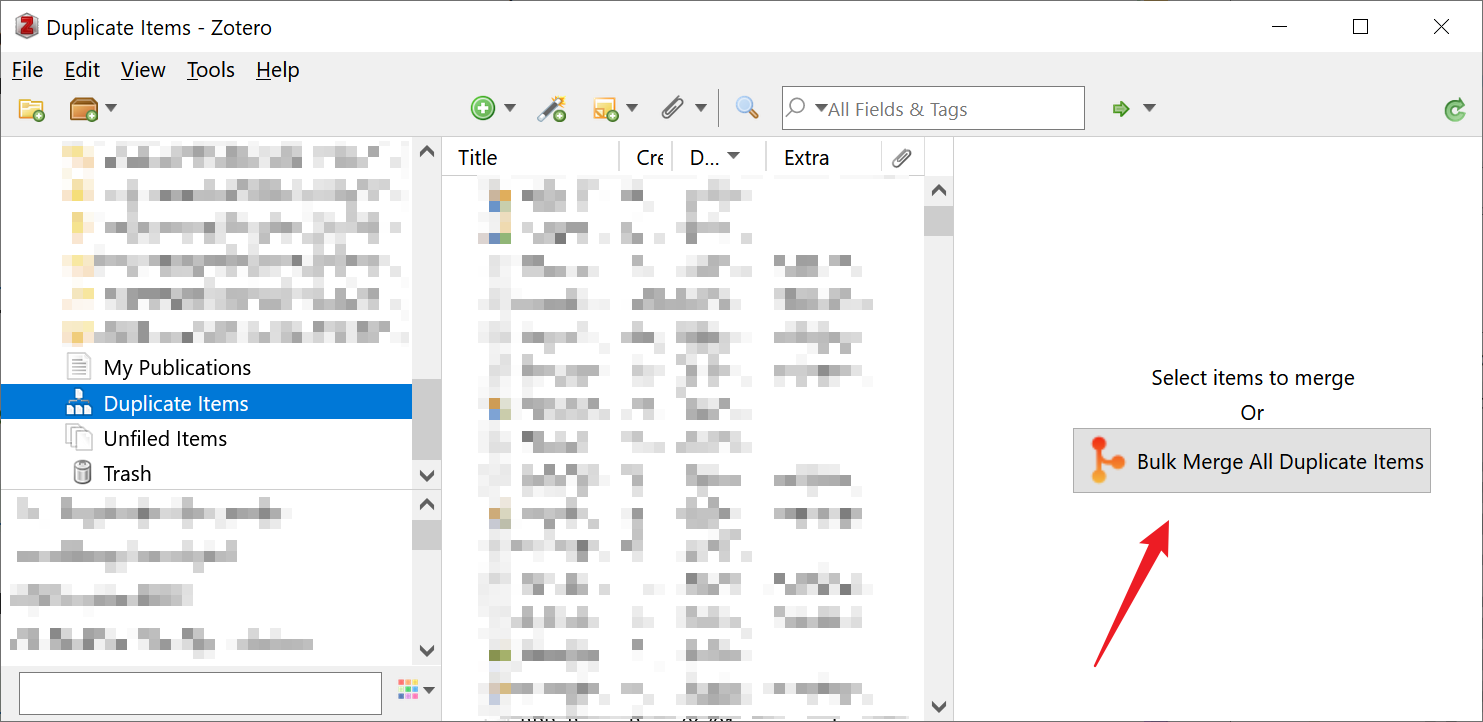
In my case, I managed 1500 duplicated items and it took just few minutes.
Fixing metadata. Linter Add-on
Linter for zotero provides a way to keep the metadata of your references consistent and clean.
Citation networks. Cita Add-on
Cita: Citations metadata in Zotero lets you manage citations both from services like OpenAlex or OpenCitations or Crossref or from your own pdfs.