Tutorial
All the examples in this tutorial can be found in the folder of examples included in the distribution.
A simple hello world Python function
Let us start with a simple hello world! example. Imagine that the file text_output.py (see here)
def hello_world(your_name):
    return f'Hello {your_name}, how are you?\n'
We need to tell letitshine that the output of this function is a text string and we want to create a self-contained app:
letitshine -type txt -i text_output.hello_world --create_app
This will create a file called app_hello_world.py which contains the module text_output.py as well as the necessary code to run the Shiny app. Note the following:
- The function to render into interactive is the function
hello_worldin the moduletext_output. - The type of the output is necessary. It can be a series of outputs, see bellow.
- If
letitshineis invoked without the--create_appflag, then the Shiny code is printed in the stdout.
The app can be run using
shiny run app_hello_world.py
to produce the following output

Improving the Shiny app = improving the Python function
If we document the above function with type annotation and a simple documentation, such as in function say_hello
def say_hello(your_name:str='Kim', say_today:bool=True):
    r"""
    What is your name?

    In this simple app We simply print your name.

    :param your_name: Name to be printed
    :type your_name: str

    :param say_today: Say today in the sentence?
    :type say_today: bool

    :return: Printed message
    :rtype: str

    Examples
    ===========
    >>> say_hello('Descartes')
    'Hello Descartes, how are you today?\n'

    """
    message= f'Hello {your_name}, how are you today?\n' if say_today else f'Hello {your_name}, how are you?\n'
    return message
we obtain, with the same arguments of letitshine a more clear interactive function:
$ letitshine -type txt,doc  -i  text_output.say_hello  --create_app
Your input had multiple arguments
Type of output=['txt', 'doc']
tex_output=False
Type of output: ['txt', 'doc']
Element 0 of output: txt
Element 1 of output: doc
Creating the selfcontained shiny app app_say_hello.py
You can run it with the terminal command:
shiny run app_say_hello.py
Running the app as indicated, you will see an interactive Shiny app with two elements:

The second element, the documentation, is automatically generated from the documentation of the Python function due to the second argument doc.
Note that the second argument, the Boolean say_today is automatically detected because the type has been annotated. Default arguments are also takend as default Shiny app arguments.
Using mathematical formulae and Sympy
The following example showcases the use of letitshine to produce symbolic math computations, which can be used for teaching. This one tries to compute the limit at a point of a quotient of two smooth functions using Taylor expansions up to a desired order. Students can interact with the orders to obtain the value of the limit.
You can see it in action here:

The function has the following heading:
from sympy import symbols, parse_expr,latex,series

def limitwithtaylor(degree_f: int = 1,
                degree_g: int = 1,
              f_s : str= 'exp(x)-x',
              g_s : str = 'sin(x)-x',
              a_s : str = "0",
              sol: bool = False) -> str:
and Sympy expresions are parsed from strings via the following
  vals={
    f:parse_expr(f_s),
    g:parse_expr(g_s),
    f: parse_expr(f_s),
    a:parse_expr(a_s)
    }


    solution="Computation of the limit:\n"
    solution=solution+("\nLimit: ")
    solution=solution+"\n$$\n"
    solution=solution+"\\lim_{x\\to "+latex(a.subs(vals))+"}"
Warning
The previous code contains a parsing of a string. Be careful with parsing unknown strings. See the function documentation
Using Strings for data input
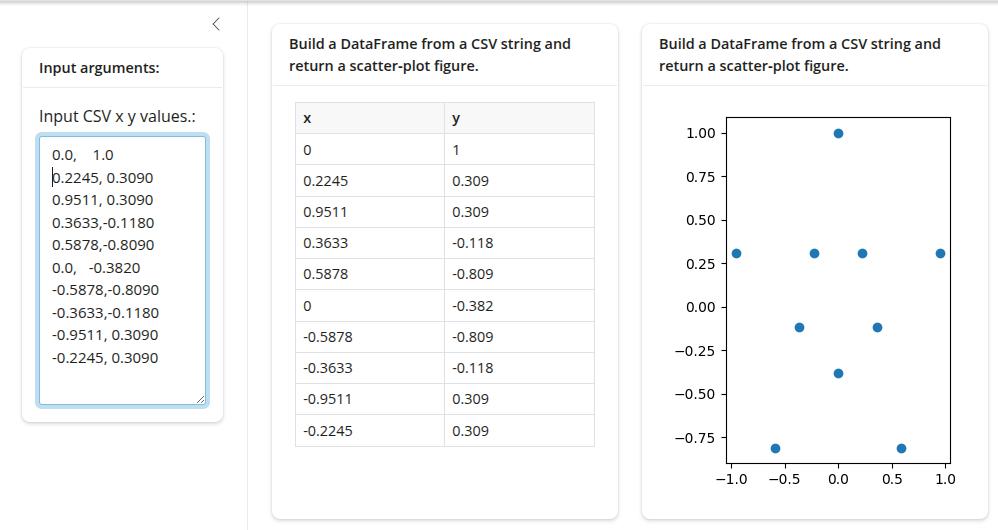
In future versions, we plan to include a file upload using Shiny input file UI. As a short replacement for small dataframes, you can use adapt your function to format a string as an object of your choice, for instance a Pandas dataframe, as in the following example
import pandas as pd
import matplotlib.pyplot as plt
from io import StringIO

def df_input(s:str =  "1, 2\n 3, 4\n"):
    """
    DataFrame and Plot from a CSV string.

    :param str s: Input CSV x y values

    """
    df = pd.read_csv(StringIO(s),names=['x','y'])
    plot = df.plot.scatter(x='x',y='y')
    fig, ax = plt.subplots()
    ax.scatter(df.x,df.y)
    return df,fig
Instead of producing an input text box, now a text area is produced because the input string contains a breakline:
 )
)
Combining mathematical output
As mathematical interactive functions are the one of the main motivations of this utitlity, we are going to take the following simple function which computes the area of a triangle given its three sides using Heron formula:
This will be the content of the following file numpy_output.pywhich will be saved
import numpy as np
def computation_numpy(a:float =3,
                     b:float =4,
                     c:float =5):
    """
    Area of a Triangle

    This simple computes the area of
    a triangle given the length of the 3 sides
    using the well-known Heron Formula.

    Simple insert the value of the sides and you are done!

    :param a: Side 1 of the triangle
    :type a: float

    :param b: Side 2 of the triangle
    :type b: float

    :param c: Side 3 of the triangle
    :type c: float

    :return: Area of the triangle
    :rtype: float
    """

    p=(a+b+c)/2
    prod=p*(p-a)*(p-b)*(p-c)
    if prod<0:
        return 'Check the sides of the triangle'
    else:
        A=np.sqrt(p*(p-a)*(p-b)*(p-c))
        return A

Notes: - You can replace the input boxes by sliders commenting the lines.
Some tips
- Use default values: Recall that non-default arguments cannnot follow default arguments.
- Use type hinting: see the documentation
- Document your function, using Numpy docstrings of Sphynx docstrings.